Quote Lifecycle — Status Summary
This chapter summarizes all the statuses a Quote and a Line Item can have in the system, to serve as a quick reference while working through the previous chapters.
Status at the Quote Level
The Quote Status column on the Quotes list and the actions in the Actions menu (see Completing the Quote) reflect the following statuses:
| Status | Observed via | Meaning |
|---|---|---|
| Draft | Quote Status column right after the Quote is created | The Quote is being drafted, not yet sent to the customer |
| Accepted | Quote Status column on the list (some sample Quotes already exist in this status) | The customer has accepted the quote |
| (Sent) | Inferred from the Mark as sent action and the Quote Sent milestone in the Workflow block | The Quote has been marked as sent to the customer — the exact status name and the interface after the transition have not been verified (see Send Quote to Customer) |
| (Lost) | Inferred from the Mark as lost action | The Quote did not win the order — not directly tested |
| (Expired) | Inferred from the Mark as Expired action | The Quote has passed its validity period (related to the Quote Expiration field) — not directly tested |
| (Cancelled) | Inferred from the Cancel action | The Quote has been cancelled — not directly tested |
| (Trashed) | The Trashed quotes view in the sidebar | The Quote has been deleted to the trash and can be restored or permanently deleted |
The statuses marked (in italics) above are inferred from the action names in the Actions menu, and have not been directly tested by actually performing the action and observing the result. When more complete testing conditions are available (e.g. a Quote already in Sent status to try Mark as lost/Expired), this document should be updated with real screenshots.
Status-Filtered Views on the Quotes List
The sidebar of the Quotes screen provides these quick filter views:
| View | Meaning |
|---|---|
| All quotes | All Quotes |
| My quotes | Quotes the current user is responsible for |
| Outstanding quotes | Quotes still awaiting processing |
| Overdue quotes | Quotes past their Quote Due date |
| Quotes due this week | Quotes due to be completed this week |
| Quotes in draft | Quotes currently in Draft status |
| Unassigned quotes | Quotes with no Salesperson/Estimator assigned |
| Unopened RFQs | Quotes that have an RFQ Number but no Line Item processed yet (see Receive RFQ) |
| Trashed quotes | Quotes that have been deleted to the trash |
Status at the Line Item Level
The Status field in the right panel of the Line Item detail screen has these options:
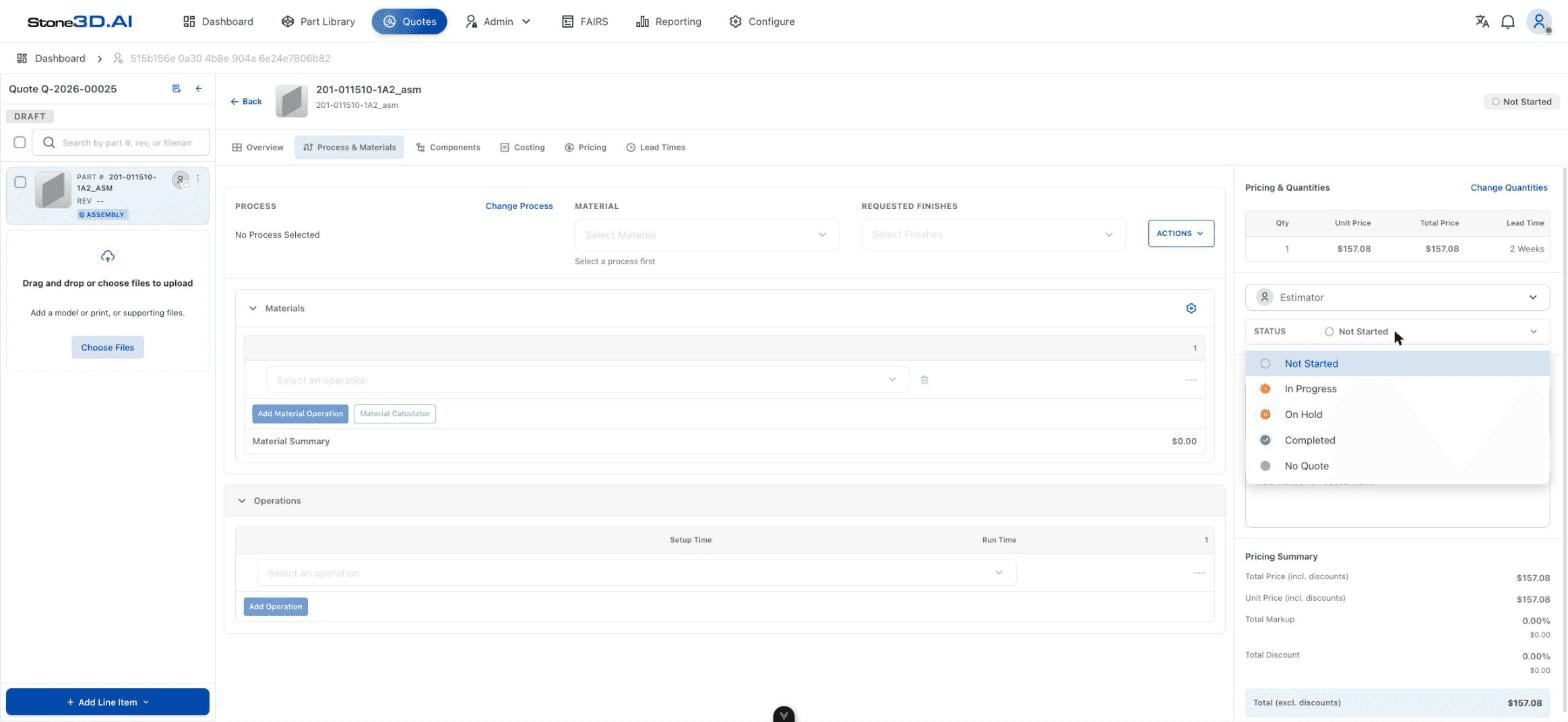
| Status | Meaning |
|---|---|
| Not Started | The Line Item hasn’t been processed yet — the default status after adding a Part |
| In Progress | Currently being worked on (setting up Process, Pricing…) |
| On Hold | Processing temporarily paused |
| Completed | Finished — required for the Quote’s Outstanding Work milestone to report “All quote items complete” |
| No Quote | A decision not to quote this Part (e.g. insufficient manufacturing capacity) |
Confirmed through testing: the Outstanding Work block on the Quote screen only shows “All quote items complete” after every Line Item has been switched to Completed — and the page needs to be reloaded for this value to update correctly (see Review Quote).
Quote Status Transition Diagram (by Workflow Block)
RFQ Received  →  Quote Started  →  Outstanding Work  →  Quote Sent
  (manual)        (automatic on       (automatic based        (via the
                   Quote creation)     on Line Item             Mark as sent
                                       Status)                  action — not
                                                                 fully verified)