Completing the Quote — Moving from In Progress to Ready to Send
Why: After the review is done, the Quote needs to change status to clearly mark that it is ready to send to the customer, separate from Quotes still being drafted (Draft).
Where Status Changes Are Performed
On the Quote editing screen, click the Actions button (bottom-right corner) to open the menu:
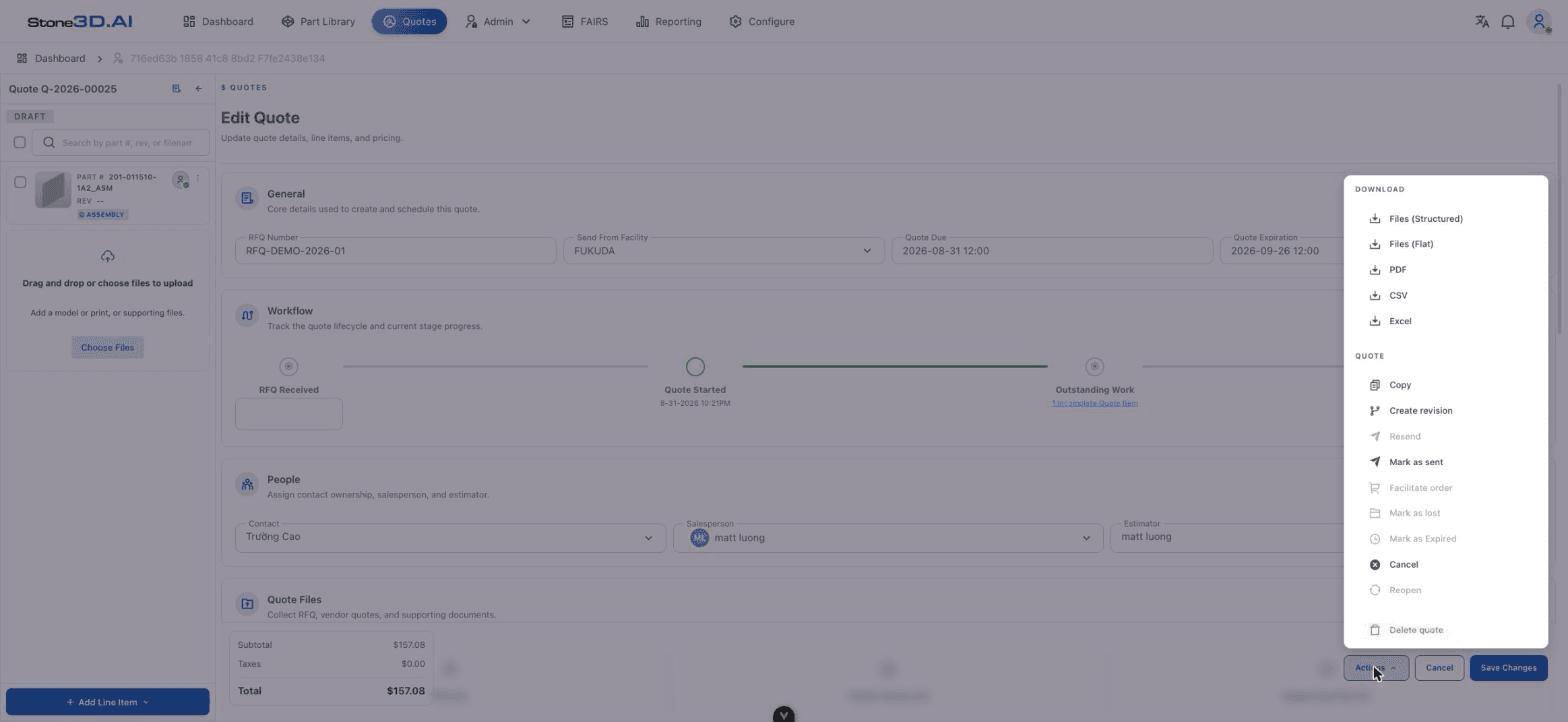
The QUOTE group in this menu contains the status-changing actions:
| Action | Meaning |
|---|---|
| Copy | Quickly duplicates the Quote |
| Create revision | Creates a new revised version of the Quote |
| Resend | Resends the Quote (only available after the Quote has already been marked as sent once) |
| Mark as sent | Marks the Quote as sent to the customer — see details in Send Quote to Customer |
| Facilitate order | Moves the Quote into the order-processing flow (only available in the appropriate status) |
| Mark as lost | Marks the Quote as having not won the order |
| Mark as Expired | Marks the Quote as expired |
| Cancel | Cancels the Quote |
| Reopen | Reopens a closed Quote |
| Delete quote | Deletes the Quote (an irreversible action) |
During testing, in Draft status, the Resend, Facilitate order, Mark as lost, Mark as Expired, and Reopen items appeared grayed out/unclickable (disabled) — confirming that these actions are only available once the Quote has gone through earlier steps in its lifecycle (e.g. it must be “Mark as sent” before “Resend” becomes available). See Quote Lifecycle for the exact sequence of status transitions.
Conditions to Complete Before Sending
No incomplete Line Items remain
Outstanding Work must show “All quote items complete” (see Review Quote).
All changes have been saved
Click Save Changes before performing a status-changing action — during testing, the “Mark as sent” action failed (“Action failed. Please try again.”) while the Quote still had unsaved changes; after clicking Save Changes, this error disappeared on the next attempt (though “Mark as sent” itself still needed further verification afterward — see the Callout below).
People fields are fully filled in (Contact/Salesperson/Estimator)
These are required fields from the Create Quote step onward (see Create Quote), so they are usually already satisfied by this stage.
Not fully verified: during testing, the “Mark as sent” action kept returning the error “Action failed. Please try again.” even after every Line Item was Completed and the Quote had been Saved. The specific cause (e.g. a requirement to select a Process on the Process & Materials tab, a missing attached RFQ file, or some other backend condition) could not be determined within the scope of this testing. This is a point the development team should investigate, or provide a clearer error message for the user.
Who Can Change the Status
The current system showed no clear role-based access control (RBAC) restrictions on the actions in the Actions menu during testing (the test account could see and operate the entire menu). Whether role-based permissions exist (e.g. only a Sales Manager can Mark as sent) has not been verified — this needs further checking with accounts of different roles.
Result: Once the conditions are met, the Quote is ready for Generate/Export and sending to the customer.